

I’ll bet you know that feeling. Shocked? Yup.
Yes, Google recently updated its Chrome browser. Yes, it’s the most popular browser in the world.
Google’s latest browser update includes a real humdinger. It lets everyone know if you’ve been caught with your pants down.
How do you stop Google in its tracks?
- Be smarter than your small business competition.
- Upgrade your website right now so it’s secure.
You also don’t have much time. Google’s new sign showing your website is “Not secure” shows up in Chrome release version 56. Many people will already have updated to the new version, so the clock is ticking.
What is HTTPS or a SSL certificate?
When that padlock symbol is in your browser address bar, that’s when you have a secure connection. It’s easy to know because it’s usually pretty obvious.
Google is doing what it feels is best for us. I know it sounds a bit like overkill. Google wants all websites to be secure. It doesn’t matter whether you are collecting any information or not.
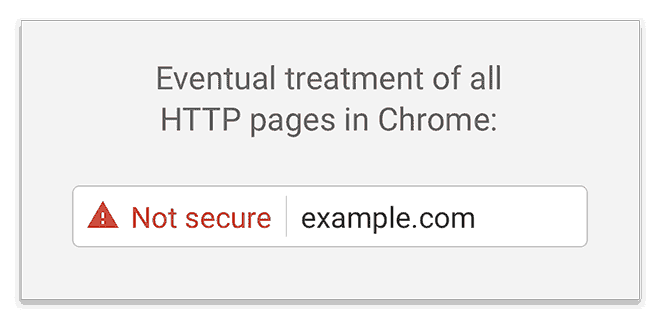
Image credit: Google.
Starting in January 2017, Google Chrome (version 56) will show a warning in red if your website is not secure.
No padlock = “Not secure” warning = lower trust.
The official announcement:
Moving towards a more secure web
Updated on 12/5/16 with instructions for developers] Developers: Read more about how to update your sites here. To help users browse the web safely, Chrome indicates connection security with an icon in the address bar. Historically, Chrome has not explicitly labelled HTTP connections as non-secure.
Even if the only information you’re collecting is in a simple contact form, it doesn’t matter. A warning will show in the browser, indicating your website is “not secure.” This will also have a noticeable effect on search engine rankings and on visitor numbers. It matters.
How can you tell if a site is secure?
Not secure = http://www.yourwebsite.com
Secure = https://www.yourwebsite.com
HTTPS = good
HTTP = bad
There’s no need to despair. You can have your existing website converted to use HTTPS. It’s a technical process and requires you to buy a SSL certificate. I recommend you hire a web developer to do this because it’s involved and technical. It usually takes two to four hours. If your website is large with a lot of functionality to complicate matters, it’ll take longer.
Your easiest option may be your hosting company, who can help you with the SSL certificate. This is mandatory for secure websites.
Make this a top priority.
Like it or not, Google decided we all needed a little push.
Chrome version 56 is here.
Is your website HTTPS/SSL ready?

Edward Solomon has over 30 years’ experience in project management, technical education, computer networking, web design and development and is a Digital Business Consultant for PENNInk Productions Ltd.