


Most business owners understand that Search Engine Optimisation (SEO) is necessary to bring potential customers to their websites. But optimising your pages without a solid SEO strategy is not going to bring you the results you are expecting.
Follow the four steps we’ve outlined in this article and you will be able to accomplish an SEO strategy that will increase your traffic and make your website more visible to the kind of visitors you are targeting.
Step 1. Set Goals and Define Your Audience
Before you start implementing anything, you need to decide how you will measure your success. This is more than just ranking highly in search results – it’s understanding why you want to rank highly.
There are two obvious answers to that question:
Branding
- This goal is to make your brand visible to as many users as possible, and creating a positive bond between your brand and the person.
- The way to measure this is tracking your increased traffic and better user engagement (click through rate, impressions, decreasing bounce rate).
- If you optimise your site for brand awareness, it won’t necessarily lead to increased sales. It will, though, make you memorable and increase the chances of return visitors who are ready to convert.
Conversion
- A conversion is an action taken on your site, and it can range from a sale to an email newsletter signup to downloading an app.
- To measure success for your conversion goals, just check if the total number of conversions is increasing.
- As you might have guessed, this is the most common goal for digital marketing.
You don’t have to choose one or the other, here. You can customise your SEO strategy so you are targeting keywords that will rank well for high-volume, poorly-converting searches; you can also target really well-converting keywords that don’t see as much volume.
Determine Your Audience
Next, you have to determine who your potential customers are. To do this, you have to create buyer personas, which are generalised representations of your customers.
Buyer personas will tell you who is interested in your products or services. Google Analytics can help you construct these personas if you haven’t already done so.
To begin, try to understand the broad information about your audience. In Google Analytics, select Overview under Demographics. This will show you a breakdown of your visitors by age and by gender.
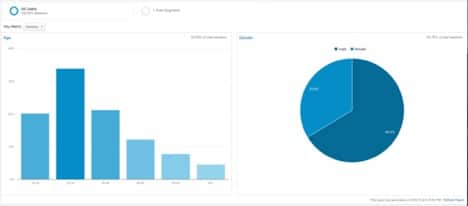
A quick look at the image above shows us that the target audience for this business is men between the ages of 25-34. Now that we know the broad information about the audience, we can get more granular.
Next, we check the Interest reports. Here, you can see what your audience is interested in and what they are in-market for when they land on your website.
If you want to get even more specific, you can solicit customer interviews/surveys or get customer information with personal data forms on your site. The type on information you gather will depend on your business, but here are some things you can ask for:
- City, state or country
- Industry
- Job title, role and/or responsibilities
- Company size
- Family background and status
Step 2. Finding and Using the Right Keywords
Since Google’s Hummingbird update, your SEO strategy should be optimised according to the way people are using search engines to achieve a certain goal. Sometimes, that user wants to complete a transaction immediately, other times the user just wants an answer to a question.
Here are the three general ways people use search engines:
To find information
- These searchers are usually not looking to buy anything, or they are at the very beginning of their conversion process. These searches typically use phrases like “what is”, “do I need”, “how to” or “where to find”. These searches probably aren’t going to convert the first time they come to your site. But, since informational keywords make up the majority of online searches, it’s a good idea to target these users and use retargeting to get them when they are further down the sales funnel.
To learn more about something
- It sounds similar to the first kind of search, but usually these users are further along in the sales process. They have already come to the conclusion that they need a certain type of product or service and they are trying to figure out which one is best. In their searches, these people will usually use “top 10”, “deals on”, “cheap” or “review”.
To complete an action
- These searchers are using the search engine to complete a task, like creating an account or making a purchase. When these visitors click a link from the Search Engine Results Page (SERP), they expect to land directly on the page that will allow them to complete that task. These keywords don’t see a whole lot of volume, but their conversion rate is crazy-high.
Think about your ideal buyer persona. What part of the conversion funnel is he or she at? Answering this will help refine your strategy.
Do you want to target those just finding out about your industry to improve brand awareness? Or would you rather your competition do the grunt work while you optimise just for conversions?
Don’t panic – there is no wrong answer, and you can do both at the same time. If you are feeling ambitious, you can also run simultaneous campaigns to optimise your landing page for each type of user, which will help them move through the whole conversion process.
Starting Keyword Research
You can use your SEO strategy to categorise your keyword research, and you can do that with your analytics.
Take a look at your organic search traffic to find keywords that fit each persona and campaign goal. For example, if you are running a branding campaign, you’ll want to look at impressions, CTR and average position. Get this information by syncing your Google Search Console account with your Google Analytics.

If you are wanting to optimise for conversions, you can add conversion rate and abandoned funnels to your analytics report.
Now that you’ve compiled a list of keywords for each persona and that match your strategic goal, you can do some keyword research and expand your list. There are plenty of keyword research tools available for you to get ideas.
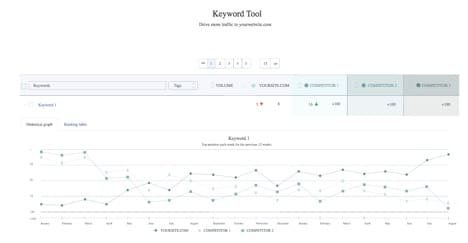
Next, add your keywords in WooRank’s Keyword Tool to see the estimated monthly search volume and your site’s current and historical rankings for each keyword you choose.
Step 3. Shape Your Website for SEO
Your landing pages should be built around your keywords with a landing page for each keyword topic. It’s really difficult to make a page rank for multiple, unrelated keywords.
Ideally, the amount of keywords and landing pages you have would match the number of product or category pages your business has (plus the business locations and special offers).
If you build your website this way, you will rank more easily and make sure your business is getting in front of the right audience.
Here is where your keywords should be in your landing pages:
URL
- You should include your keywords at the beginning of the URL so both humans and search engines know what sort of content to expect from your page. If your keyword has multiple words, underscores in URLs is not recommended (which_looks_like_this). Hyphens should be used instead, which search engines see as a word separator. With underscores, they will read /keyword_research as /keywordresearch, making it difficult for them to understand the URL.
Title Tag
- Search engines rely on title tags more than almost any other on-page attribute to figure out what your page is about. You can optimise them by including keywords at the beginning of the title tag. If you have the room to do so and you want to include several keywords, your location, or your brand, you can use the pipe character (|) to separate them.
- Make sure your title tag isn’t too long, or it will get cut off in the search results. Search engines are wise to any sort of manipulation tactic, so don’t try to stuff your keywords into the title tags or repeat keywords again and again.
Headings and Subheadings
- Search engines use headings and subheadings to help them figure out a page’s topic. The <h1> tag is the most important header on your page and should be considered the title of your page content (it’s not the same as a title tag). Use your keyword in the <h1> tag.
- <h2> through <h6> are used to structure content for the readers; here you can use your keywords and semantically-related words and phrases throughout the page.
- Heading tags give your site structure, which is excellent for user experience (UX). Good UX is crucial to your SEO strategy.
Meta description
- Meta descriptions aren’t necessarily a ranking factor, but they are important for your SEO. Google will combine descriptions with title tags and URLs to form search snippets that are seen in search results. It’s good practice to use enticing words here, like “deals” or “reviews”, or anything you think will attract a user to click (that is still relevant to your content, of course).
- A good meta description will help improve your organic CTR, which is a ranking factor. Alternatively, a bad meta description can cause a high bounce rate, telling search engines that your content doesn’t match what visitors expect to find on your page.
Step 4: Track Your Results and Adjust Your Strategy
SEO is always evolving. You can’t just implement a one-time strategy and forget about it. You need to track your progress so you can see if your strategy is working for the goals you set in the beginning.
Monitor your increases and decreases in search traffic to get a better idea of your progress. If you can pinpoint what is working and what isn’t, you can stay on top of your SEO efforts and refine your strategy to maximise your results.
When you set up reports in your analytics that track your traffic, you can also discover if that traffic is helping you attain your campaign goal of either brand awareness or increased conversions (or both).
Are you seeing high bounce rates on your landing pages? Maybe your content isn’t resonating with your buyer personas. Are you seeing less conversions on your product pages? Maybe your target keywords aren’t being used by the users at the bottom of the sales funnel.
Luckily, if you are paying attention to the right metrics, you will be able to make adjustments and start moving toward your goal.

Courtney McGhee is Lead Marketer for WooRank and has experience in digital marketing, news reporting, and social media. She switched gears after 7 years as a journalist to join the ever-changing world of SEO.